The Security Architecture and Privacy Considerations of PaperAI
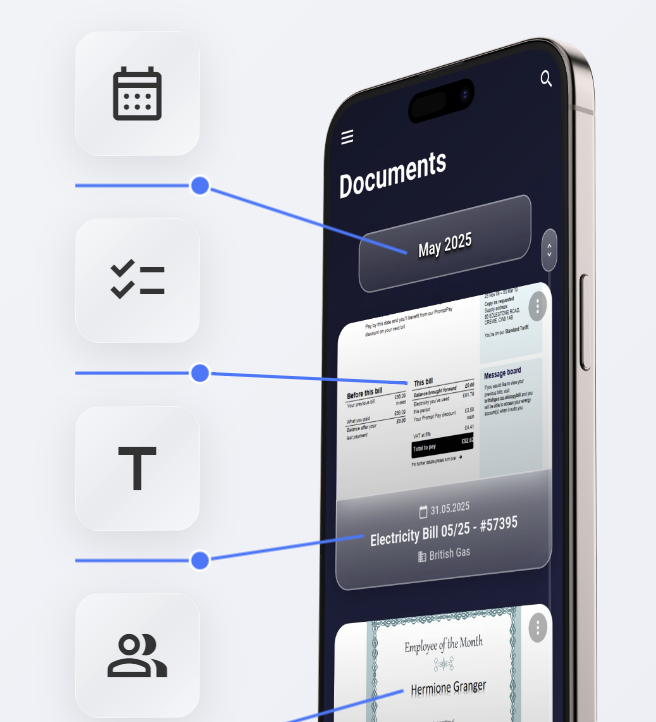
PaperAI is a document management app I created to digitize and organize files. Physical documents can be scanned or digital ones imported, and the app uses AI to generate relevant metadata like the title, correspondent, and tags. It also extracts dates to build a timeline view of the documents. This enables the user to find any document by searching or filtering its content, tags, or correspondent. All documents can be synced across the user's devices (iOS, Android, web) and backed up with a zero-knowledge encryption model.
While these features make the app useful, its foundation is the zero-knowledge security model. This approach was a core requirement from day one. I wanted to solve a fundamental problem I saw in cloud-based services: the forced trade-off between convenience and privacy. To achieve this, I decided that a zero-knowledge architecture wasn't just a feature—it means that the entire system is designed so that I, as the service operator, can never access the plaintext content of my users' documents. Let's dive into the technical details of the cryptographic implementations.
The Foundation: Client-Side Cryptography
The core principle of PaperAI's security is that all sensitive cryptographic operations occur on the user's device (the "client"). The server's role is relegated to storing and retrieving encrypted blobs of data. It has no knowledge of the keys used to encrypt them. This model fundamentally limits the impact of a potential server-side breach. If the backend infrastructure of PaperAI were ever compromised, attackers would find user accounts and encrypted metadata, but they would not possess the keys required to decrypt any user documents.
User Authentication and Key Derivation: The Entry Point
A user's password is the primary secret that unlocks their data, so protecting it is the first critical step. User passwords are never transmitted. Instead, I implemented a password-based key derivation flow using Argon2id. For this, the cryptography (v2.0.1) package in Flutter was utilized.
Here's how it works during registration and login:
- Salt Retrieval: The client first requests a unique salt from the server associated with the user's email. To prevent user enumeration attacks, the server returns a real salt for existing users and a securely generated dummy salt for non-existent accounts.
- Client-Side Derivation with Argon2id: The client then takes the user's password and the retrieved salt and feeds them into the Argon2id algorithm. I chose Argon2id specifically because it is a memory-hard function, designed to be resistant to GPU-based cracking attempts that may defeat older algorithms. The parameters are configured for a strong balance of security and performance on mobile devices:
- Memory cost: 64 MiB (m=65536)
- Iterations: 2 (t=2)
- Key Splitting: The 256-bit output from Argon2id is split into two distinct components:
- Authentication Hash: This is a hash derived from the password, which the client sends to the server for login verification. The server validates this incoming hash against the one that was stored during the user's registration. If they match, the server issues a short-lived JSON Web Token (JWT). The client then uses this JWT to authenticate all subsequent API requests for that session.
- Master Encryption Key: This key is also derived from the password each time the app is started but, crucially, it never leaves the user's device. It is held in memory for the duration of the session and is used to encrypt and decrypt all user data.
Document and Metadata Encryption
With the Master Encryption Key active in memory, the next step is to encrypt the user's data. A common approach might be to use this master key directly for all encryption, but this is inefficient and less secure. Instead, I implemented a more robust two-tier system.
For each new document, a unique 256-bit Document Key is generated on the client. This key is used exclusively for that single document and all its associated data. The document file, its on-device generated preview image, the OCR text, and all AI-generated metadata (title, correspondent, tags) are then encrypted using this new Document Key.
To store this Document Key securely, it is itself encrypted using the user's Master Encryption Key and then added to the meta data of the document. Both of these encryption operations use AES-256-GCM (Galois/Counter Mode), leveraging the cryptography (v2.0.1) and webcrypto (v0.5.3) packages depending on the platform.
My choice of AES-256-GCM was deliberate. As an Authenticated Encryption with Associated Data (AEAD) cipher, it provides two essential properties:
- Confidentiality: The 256-bit key size protects against brute-force attacks.
- Integrity and Authenticity: GCM mode produces a 128-bit authentication tag. If the ciphertext is tampered with, the tag validation will fail, and decryption will be aborted.
This architecture provides two significant advantages. First, it limits exposure; if a single Document Key were ever compromised, only one document would be at risk, not the user's entire library. Second, it makes changing a user's password (and thus their Master Key) extremely efficient. Instead of re-encrypting gigabytes of document data, the system only needs to decrypt and re-encrypt the small Document Keys with the new Master Key.
For every encryption operation—both for the document with its Document Key and for the Document Key with the Master Key—a new, cryptographically random 96-bit (12-byte) nonce (number used once) is generated. Using a unique nonce for each operation is important, as it prevents two identical plaintext files from producing the same ciphertext, which would otherwise leak information. The final payloads uploaded over HTTPS/TLS consist of the encrypted document itself and the encrypted meta data elements, both structured as a concatenation of their respective nonce, ciphertext, and authentication_tag.
Document Uploads via Presigned URLs
In my architecture, I decoupled the backend with its database from the storage server where the documents are stored in an encrypted state. The flow for uploading a document is as follows:
- The client, having encrypted a document locally, informs the backend that it needs to upload a new file.
- The PaperAI backend authenticates the request and then asks a S3 based storage server located in Germany to generate a special, time-limited presigned URL. This URL grants temporary
PUTaccess to a specific object key in the S3 bucket. - The backend also attaches conditions to this URL, such as a maximum file size to prevent abuse.
- The backend returns this presigned URL to the client.
- The client then uploads the encrypted data directly to S3 using the provided URL.
This architecture ensures that the backend servers only orchestrate storage permissions; they never actually see or handle the document itself even if it is encrypted.
Local Security: Protecting Data on the Device
The security of this model ultimately relies on the security of the client device. To harden this aspect, I use the flutter_secure_storage plugin, which leverages platform-native facilities for storing sensitive data like authentication tokens:
- On iOS, it uses the Keychain Services.
- On Android, it uses the Android Keystore system.
These mechanisms protect credentials from other apps on the device. Furthermore, the Master Encryption Key is only held in memory during an active session and is purged upon logout, minimizing its exposure.
AI-Powered Analysis: Balancing Privacy and Performance
One of PaperAI's core features is its ability to intelligently understand the user's documents. After the on-device OCR process recognizes the text from a scan, a Large Language Model (LLM) analyzes it to automatically suggest a title, extract the correspondent, and generate relevant tags. This metadata is what enables the user to quickly filter the personal archive or search for things like show me all letters from company X.
However, using powerful LLMs presents a direct challenge to the zero-knowledge principle. High-quality analysis typically requires large models that are not feasible to run on a mobile device. This creates a trade-off between privacy, convenience, and the quality of the results. Instead of making that choice for the user, I designed PaperAI to offer three distinct options, giving the user full control over his or her data.
Option 1: Local On-Device Analysis (Maximum Privacy)
For Android users, there is an option to run document analysis entirely locally. This involves a one-time download of an open-source LLM (e.g. a model from the Gemma family).
This is, unequivocally, the most private approach. The recognized text is processed on device and the unencrypted content never leaves it. The trade-off is performance and quality. Due to the model's constrained size, the quality of the generated title and tags is not on par with leading large-scale models. It’s a functional choice for those who prioritize absolute data sovereignty.
Option 2: PaperCloud Service (High-Quality & Data Jurisdiction)
The second option is to use the integrated PaperCloud service for analysis. This approach delivers significantly higher-quality results, typically just a few seconds, by using leading open-source models like Llama 3.
To achieve this, the plaintext OCR content is sent over a secure HTTPS/TLS connection to the PaperAI backend, which is hosted in Germany (EU). I want to be completely transparent about the process: the document content is held only in memory during the analysis and is wiped immediately after the request is processed. We do not store it. While this requires the user to trust PaperAI, we are bound by strict GDPR regulations. As a form of verification, every user can request an automated GDPR data export from the web app; a failure to disclose any stored content would constitute a serious violation. This provides a legal, though not technical, guarantee. I believe keeping user data within the EU is a significant privacy advantage over using US-based LLM providers like OpenAI or Google.
For the future, we are exploring options like trusted computing environments or open-sourcing the backend to provide technical guarantees as well.
Option 3: External & Self-Hosted APIs (Maximum Control)
The third option provides maximum flexibility by allowing the user to connect to any OpenAI-compatible API endpoint.
While a user could use this to send data to US firms like OpenAI or Google if he or she trusts their privacy policies more than ours, the primary reason I implemented this was to support self-hosting. Users running local APIs with tools like Ollama on their own server can simply point PaperAI to it. This gives users complete control over both the model choice and data's lifecycle.